Find it. Fix it. Before anyone exploits it.
PatchRecon checks drivers, runtimes, the operating system and your programs in the background. Whatever is outdated, insecure or missing, it fixes with your approval or on its own. Before every change, it backs up the current state.
PatchRecon is in development. The Windows version comes first, macOS and Linux follow later.
- Microsoft .NET Desktop Runtime 8Library 8.0.148.0.21 checkingCriticalfixed
- Google ChromeApp 140.0.7339.128141.0.7390.108 checkingCriticalfixed
- NVIDIA GeForce RTX 4070Graphics driver 572.83581.57 checkingHighfixed
- Visual C++ 2015–2022 RedistributableLibrary 14.38.3313514.44.35211 checkingHighfixed
- Intel Wi-Fi 6E AX211Wi-Fi driver 23.40.0.423.150.0.3 checkingHighfixed
- DirectX End-User RuntimeMissing component missing9.29.1974.1 checkingMediumfixed
- 7-ZipApp 23.0125.01 checkingMediumfixed
Five areas, one scan.
Windows Update takes care of Windows. Much of the rest is left alone until someone exploits it. PatchRecon looks everywhere gaps can appear.
Drivers
Graphics, Wi-Fi, audio, chipset. Only from Microsoft and directly from the manufacturers.
NVIDIA, AMD, Intel, Realtek
Libraries and runtimes
The building blocks that programs use in the background. Often forgotten, often vulnerable.
.NET, Visual C++, Java, Python
Missing components
What programs need but do not bring with them.
WebView2, DirectX, codecs
Operating system
Pending updates, with an eye on critical vulnerabilities and those already being exploited.
Windows Update, Defender
Apps
Browsers, Office and the tools you use every day.
Chrome, Firefox, Zoom, 7-Zip
From finding to verified fix.
Four steps, and at each one you can see what is happening and why.
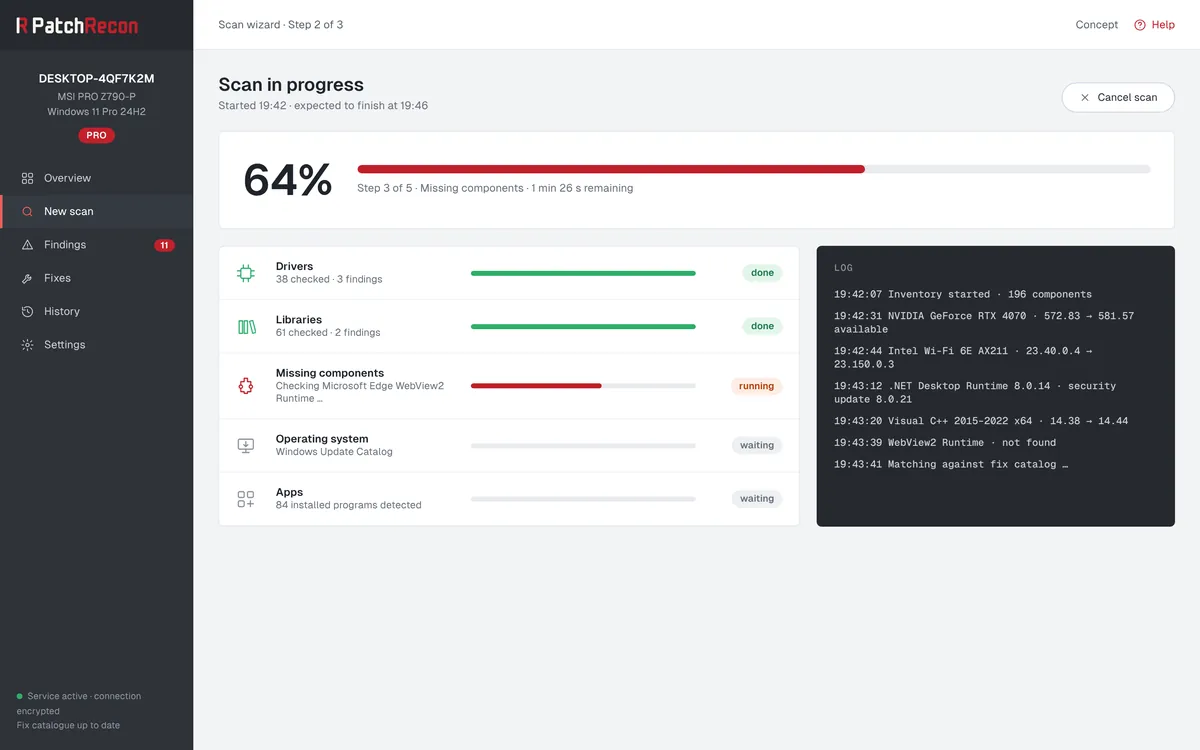
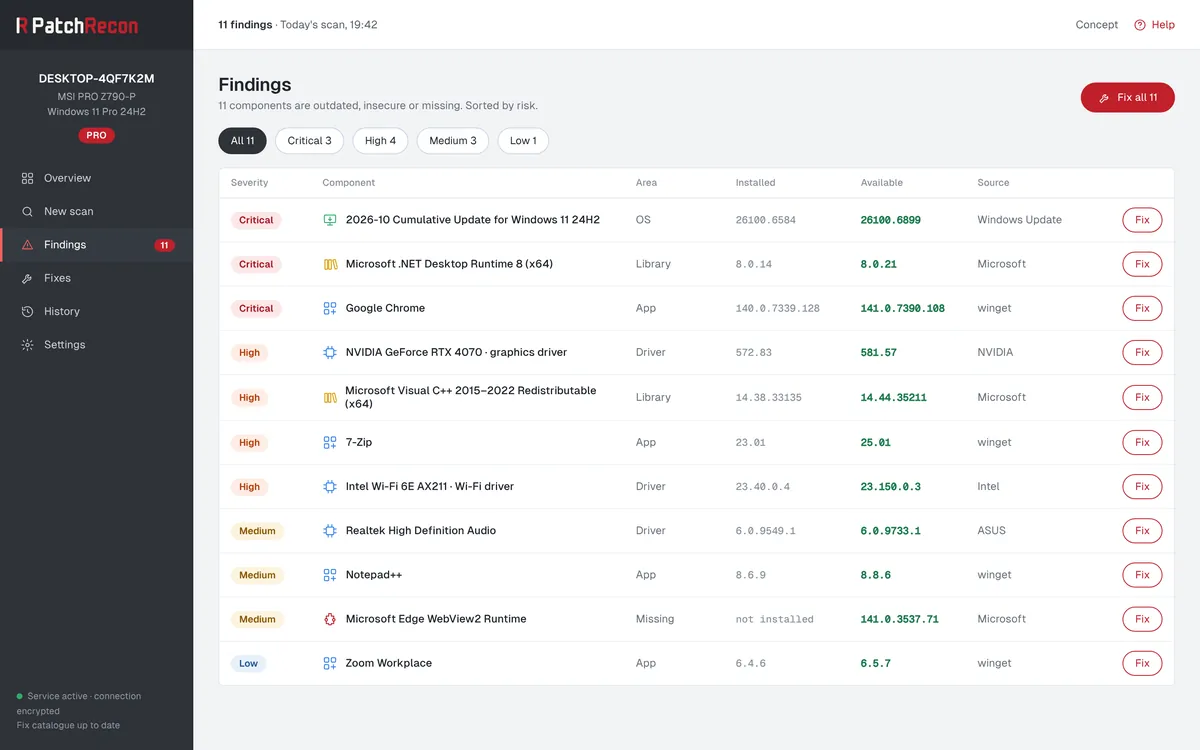
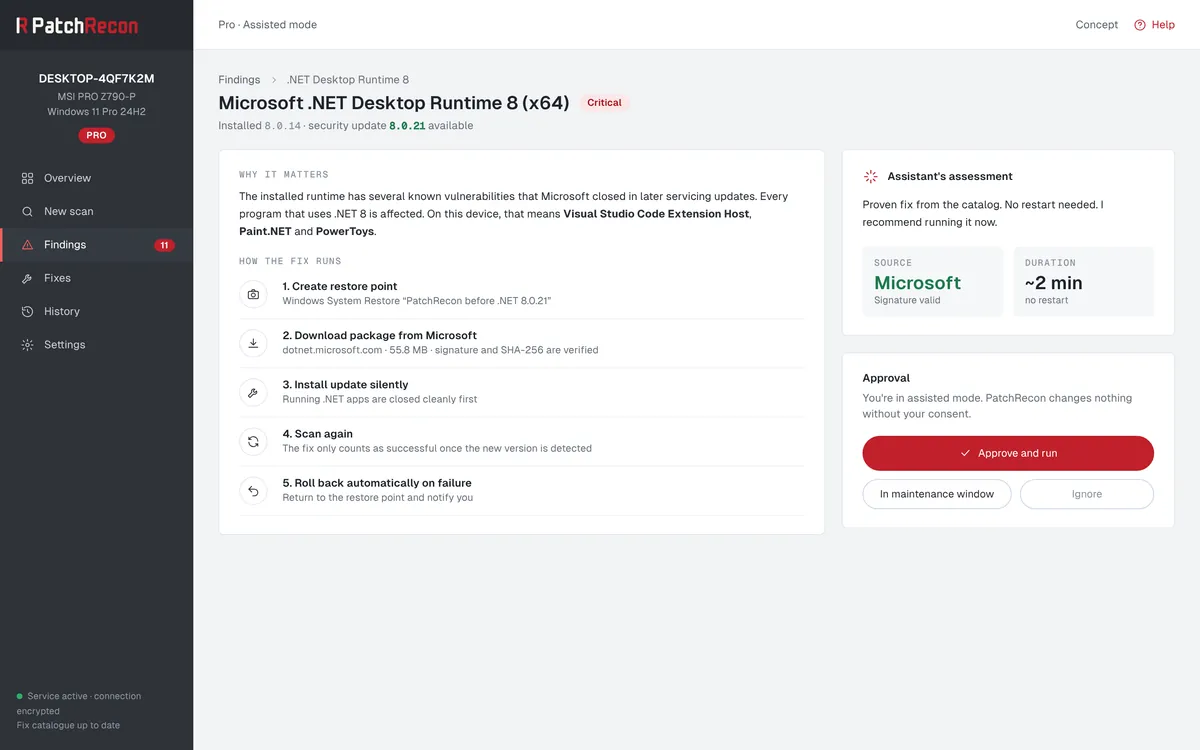
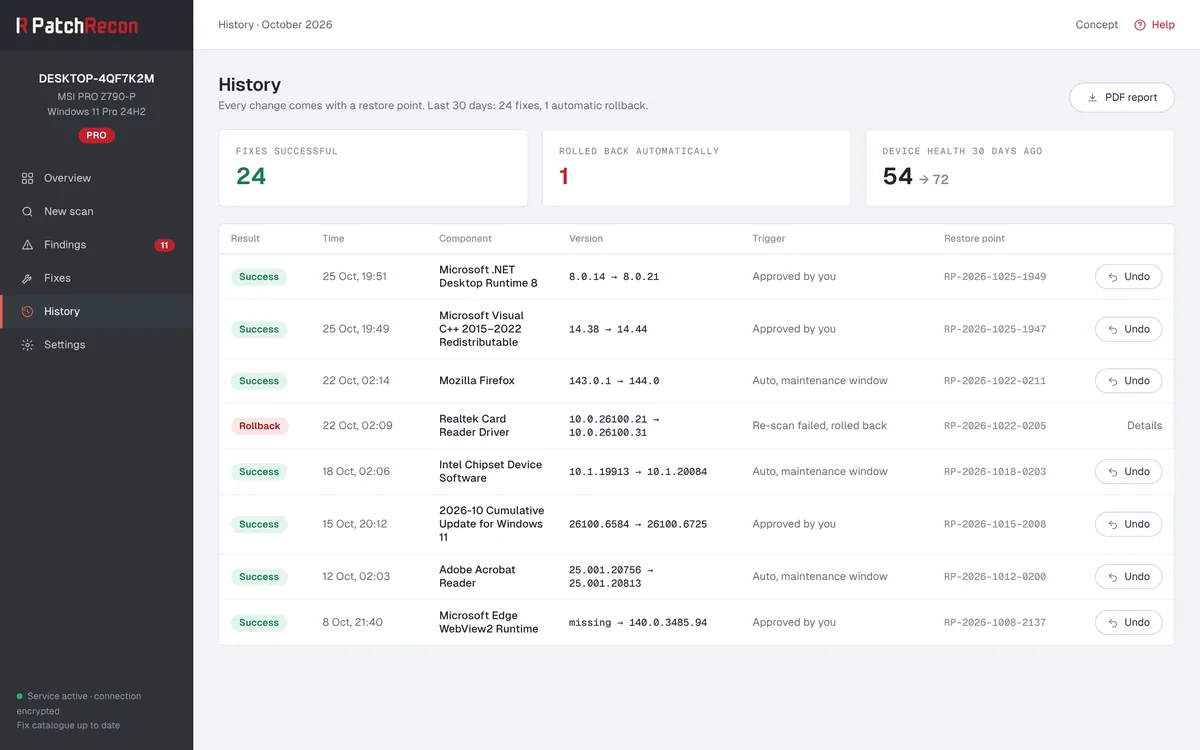
Concept view with sample data. The design may change before launch.
No fix without a way back.
An update that breaks something is not a good trade. That is why every fix in PatchRecon follows the same fixed process.
Backup first
PatchRecon turns on system protection if needed and backs up the current state.
Vendor source
Packages only from Microsoft, winget and the vendors themselves.
Signature and checksum
Anything that does not match is not installed.
Rescan
The fix only counts once the new version is detected.
Automatic rollback
If something fails, PatchRecon restores the previous state.
What leaves your device, and what does not.
For the check, PatchRecon only needs the list of your components, not the contents of your files.
Transmitted
- Component name
- Installed version
- Vendor
- Operating system version
Stays on the device
- Files and documents
- Passwords and keys
- Browsing history
- Usernames and contacts
AI where it helps.
For known cases, the fix catalogue is enough. For rare cases, an AI assistant helps: first a model on your device and only if needed a cloud model. Even then, only the metadata of the affected component is sent.
Developed in Switzerland.
PatchRecon is being built in Switzerland. The servers for checks and licences are planned to run in a Swiss data centre. The connection between app and server will be encrypted with mutually verified certificates (mTLS).
You decide how much PatchRecon does on its own.
You choose the mode for each device and can change it at any time.
Scan onlyFree and Pro
PatchRecon shows findings and changes nothing. Good for getting to know it or for devices that someone else looks after.
AssistantPro
Every fix needs your approval. You see beforehand what will happen and decide for yourself.
AutonomousPro
Proven fixes run on their own in the maintenance window, for example at night between 02:00 and 04:00. You receive a summary.
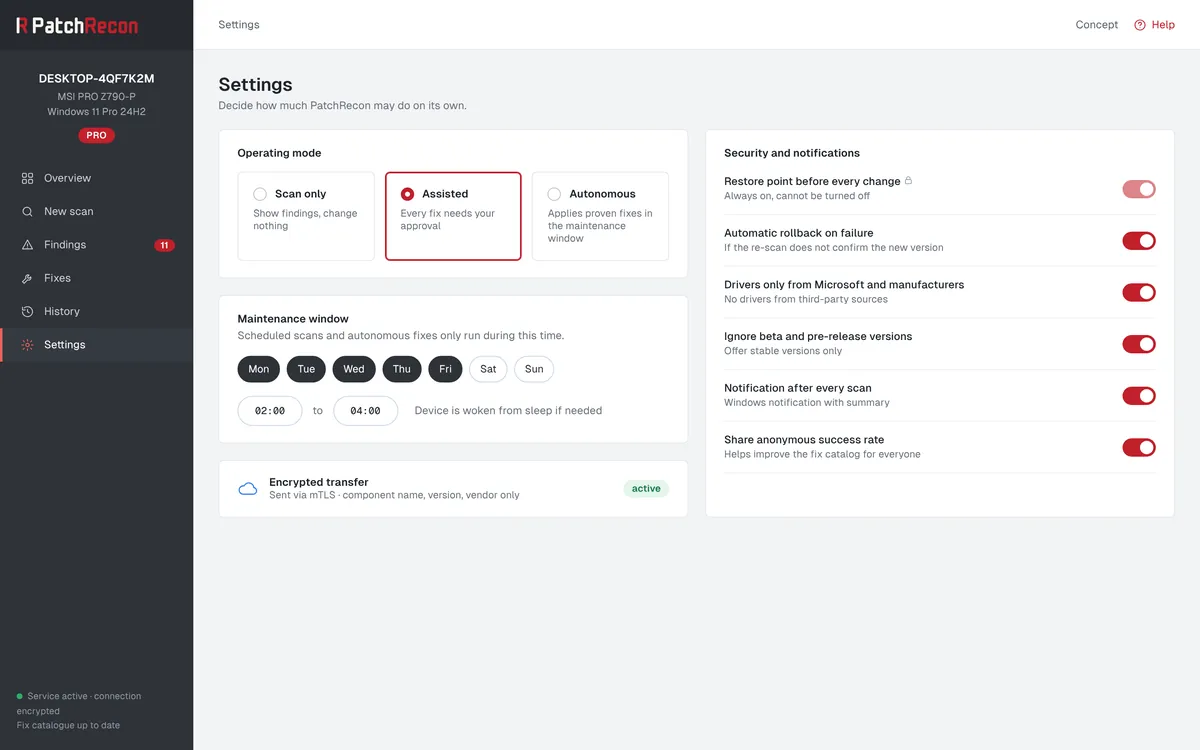
Concept view with sample data. The design may change before launch.
For Windows. Then macOS and Linux.
Each platform has its own sources. PatchRecon uses the official ones instead of distributing its own packages.
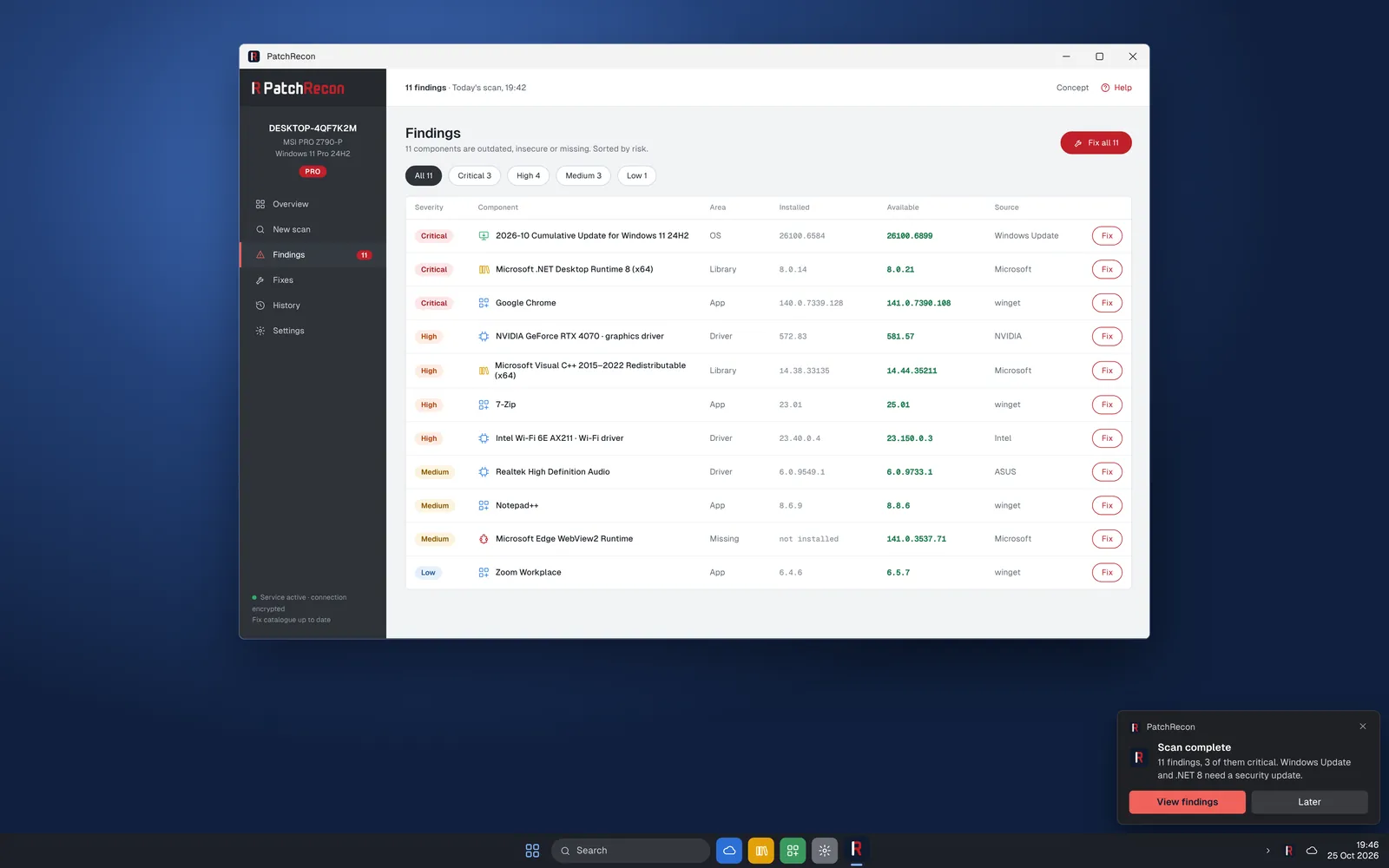
- Systems
- Windows 11 and Windows 10
- Sources
- Windows Update, winget, Microsoft and the device manufacturers
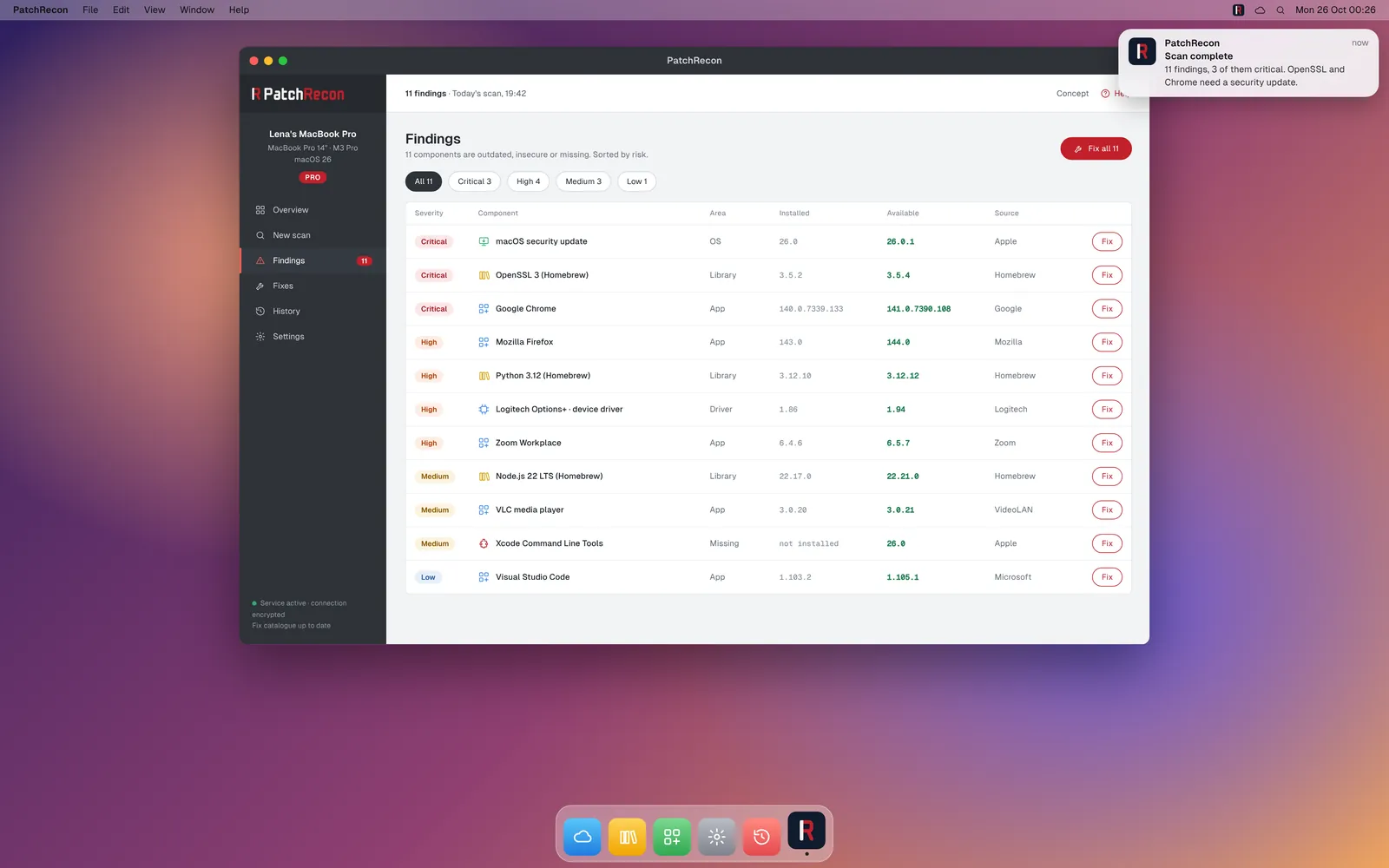
- Systems
- macOS on Apple silicon and Intel
- Sources
- Software Update, Homebrew and the app vendors
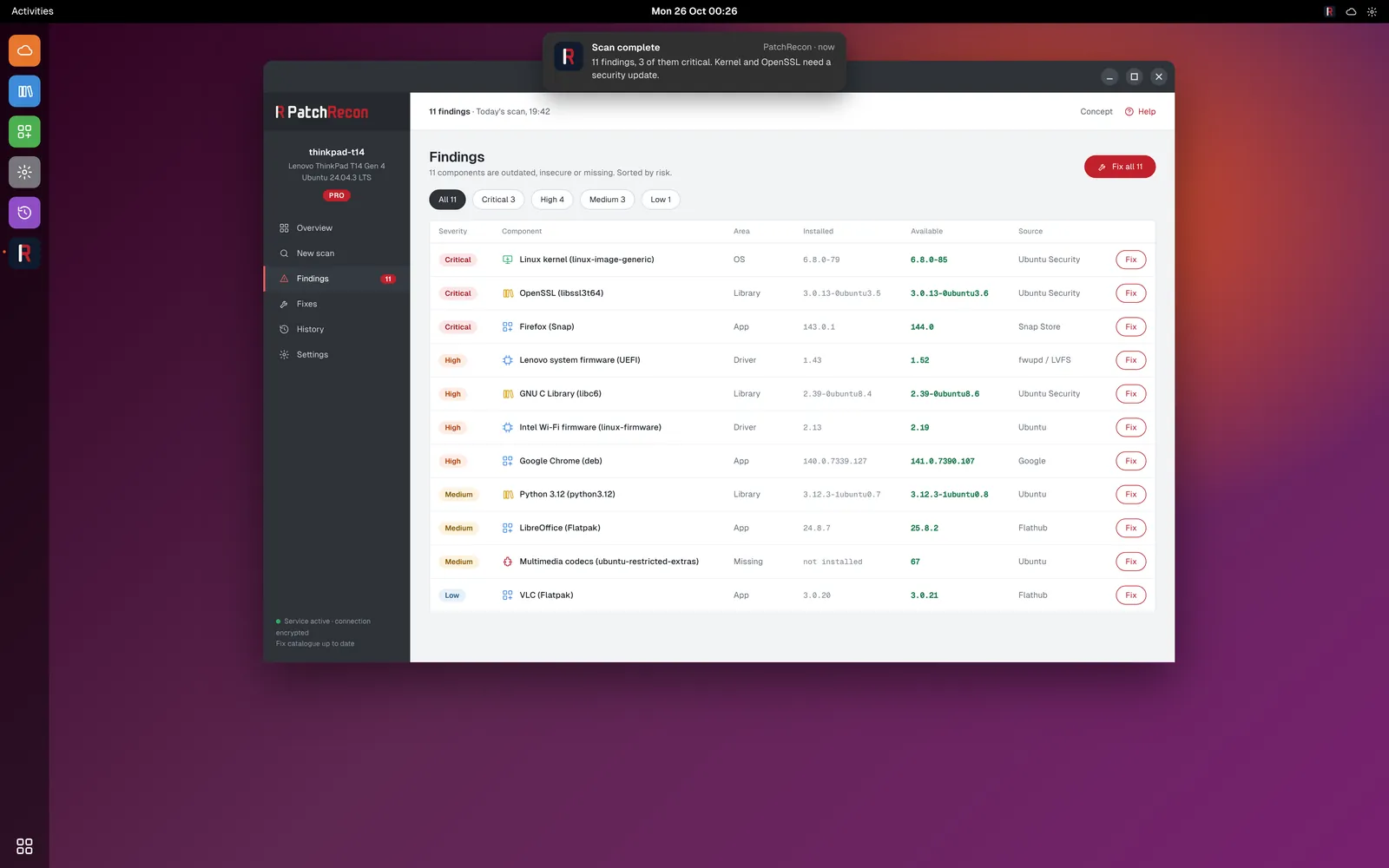
- Systems
- Ubuntu and other popular distributions
- Sources
- apt, Snap, Flatpak and firmware via fwupd
Concept view with sample data. The design may change before launch.
Finding is free. Fixing is Pro.
Free shows you what is outdated or insecure. Pro fixes it, with your approval or on its own.
PatchRecon Free
CHF 0
free forever, on every device
Scan, assess, understand.
- Scan of all five areas
- Risk rating for each finding
- Scheduled scans in the background
- Notification after every scan
PatchRecon Pro
Price to follow
Annual subscription per device, price at launch
Everything in Free, plus:
- One-click fixes
- Assistant that explains its reasoning
- Autonomous mode in the maintenance window
- Backup before every fix and automatic rollback
- History with a monthly PDF report
PatchRecon is aimed at individuals and works just as well on the devices of small businesses. Pro is licensed per device.
Join the waitlistFrequently asked questions
When can I use PatchRecon?
PatchRecon is in development. The Windows version comes first, with Free and Pro. If you join the waitlist, you will receive an email at launch.
How is PatchRecon different from Windows Update?
Windows Update takes care of Windows and some of the drivers. Programs, runtimes such as .NET or Visual C++ and many manufacturer drivers often stay on old versions. PatchRecon shows everything in one place and fixes it using the same verified process.
Where do the updates come from?
From the official sources: Windows Update, winget and the download servers of Microsoft and the vendors. Every package is checked for a valid signature and checksum before installation. PatchRecon does not offer drivers from third-party sources.
What happens if an update causes problems?
Before every fix, PatchRecon backs up the current state, on Windows for example with a restore point and a copy of the old installer. After installation, it scans again. If PatchRecon does not detect the new version or something fails, it restores the previous state automatically. You can also undo any fix in the history.
What data is transmitted?
Only the name, version and vendor of the installed components and the operating system version. No files, no documents, no passwords, no browsing history. A separate privacy policy for the app will be published at launch.
Does PatchRecon use artificial intelligence?
Yes, as help for rare cases. The fix catalogue solves known problems. When it cannot go further, an AI assistant helps, first locally on your device and only if needed via a cloud model. Even then, only metadata is transmitted.
Do I need administrator rights?
For the installation, yes, because PatchRecon runs as a service in the background. Whether fixes may later be approved without administrator rights is up to you in the settings.
What will Pro cost?
Free stays free. Pro will be offered as an annual subscription per device. The price will be announced at launch, and people on the waitlist will hear it first.
Who is behind PatchRecon?
PatchRecon is being built in Switzerland. It is developed by Kevin Schneider, who has looked after Windows, Microsoft 365 and network environments for years and knows how many gaps simply get left open in everyday use.
Be there at launch.
Sign up and you will receive an email as soon as PatchRecon is ready. Until then, we will only get in touch now and then with news, for example when there is a test version.
You're on the waitlist.
Thank you! Before you receive any news, you will get an email with a confirmation link. You can unsubscribe at any time with a short message to hallo@patchrecon.com.